
Polite payment reminders that go out on time
Set a due date once. LINKDGER prepares the reminder a day before, on the day, and again every few days until the balance is zero. You send it on WhatsApp or SMS in one tap.
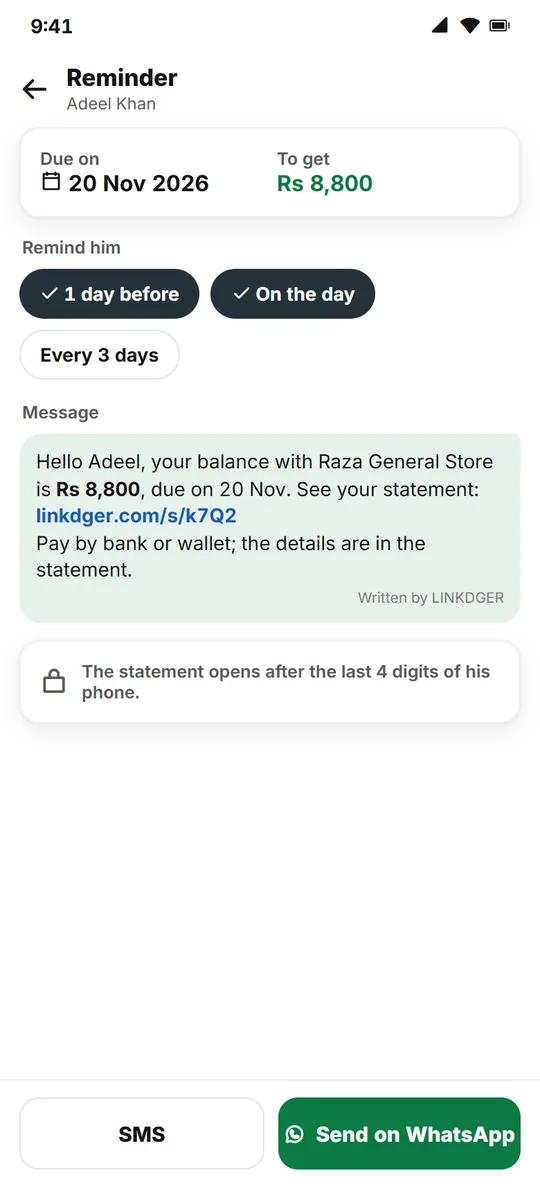
Reminders without the awkward calls
The words are ready; you only press send.
Due-date schedule
A day before, on the day, then every 1, 3 or 7 days until it is paid.
Ready to send
The message is written for you; one tap opens WhatsApp or SMS.
Statement link
Your customer opens their statement after typing the last 4 digits of their phone.
Your own words
Add your own note once, and remind any time with Remind now.
Payment details
Add how to pay you, such as a bank or wallet account.
In the app too
Customers on LINKDGER get it in chat with a notification.
How it works
Three short steps.
Set a due date
In the customer’s khata.
Check the message
Add your note and payment details once.
Tap to send
WhatsApp or SMS opens with the words written.
Questions
Does LINKDGER send WhatsApp messages by itself?
No. LINKDGER writes the message and you send it from your own WhatsApp or SMS.
What if there is no due date?
Then nothing goes by itself; you can still send a reminder any time.
Is it free?
Yes. Reminders are on every plan.
What time do reminders come?
At 10 am by default; you can change the time for each khata.
More for your shop
Set your first reminder today
Free on Android.